
Do you want to start a discussion on IFP?
With the permanent relocation of the daily IFP World Forum open discussion from CFP to IFP on 12 March 2018, many Disqus Channel participants may be wondering, how can I initiate a discussion on International Free Press?
And that’s the first thing participants should know; IFP is not a Disqus channel like CFP. Instead, IFP is an independent website currently using Disqus commenting. So although the comment-posting procedure is identical to any other Disqus forum, the process of starting a discussion post is quite different. The native Disqus channel procedures for initiating discussions do not apply on IFP.
So, what do you have to do to get started posting discussions on IFP?
Starting a discussion using the “front end” method:
For those who do not have a WordPress account, it is possible to post a discussion as a guest by clicking the Author A Post button at the top of this page.
Link: https://atomic-temporary-118824440.wpcomstaging.com/submit-a-post/
This provides a basic method of starting a simple discussion post, with a form to fill out and instructions on how to use that form. The instructions are frequently updated for simplicity and clarity.
The main limitation when using this front end method is the lack of an edit feature. After you have submitted your post, it will not be possible for you to make any changes without assistance from one of the Administrators or Editors.
All front end submissions go into a Pending file, and all are subject to editing before approval. This is to ensure compliance with copyright rules and to prevent spam posts from going directly to publication on the IFP home page.
Setting yourself up to use the “back end” method:
“Frequent fliers” who intend to post new discussions often will probably want access to that edit feature that’s missing from the front-end method described above. For that, you will need to get a free WordPress account and then ask an administrator to set you up as a WordPress author on IFP.
So how do you get started posting discussions with WordPress on IFP?”
The first step is to create your free WordPress account. The emphasis is on “free” here because there is no need to pay anything to participate at IFP. If you follow these instructions carefully you will avoid all charges.
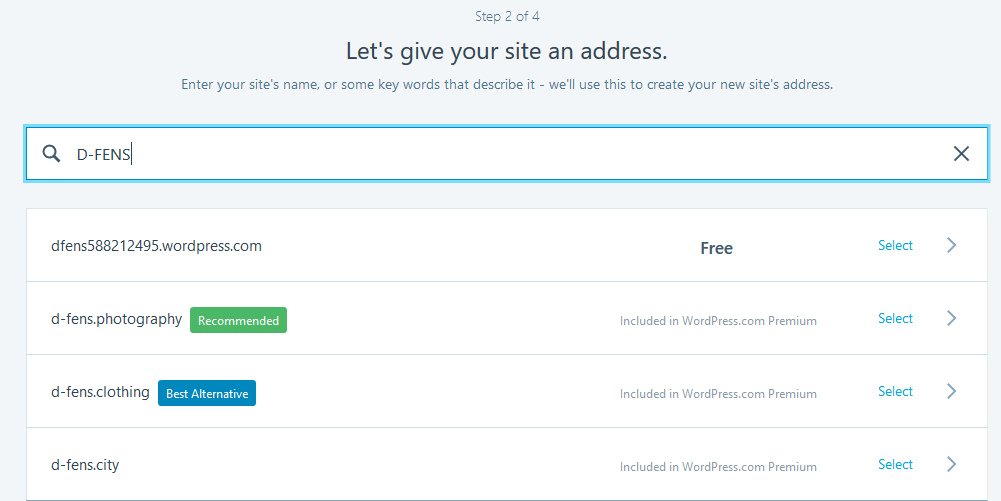
Go here and click Get started. On the Step 1 screen, leave all fields blank and click Continue. On the Step 2 screen, enter something in the field where it says enter a name or keyword, and you will then be presented with several options. Select the option at the top of the list that’s marked Free as shown in Figure A.
In the Step 3 screen, You will be presented with three Paid options. If you want a free WordPress account, don’t select any of them. Scroll to the bottom and click Start with Free, as shown in Figure B.

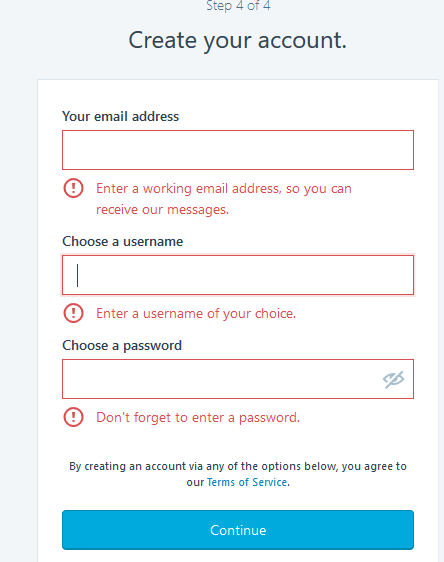
This will take you to the Step 4 screen as shown in Figure C, where you can create your free WordPress account:
After you have set up your WordPress account, log in to the account here (you may want to bookmark this login screen for future use) Then you will see a screen that looks like Figure D below:
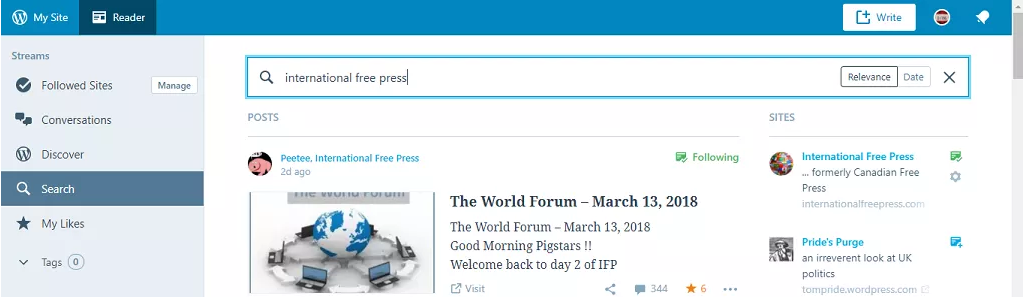
Type International Free Press in the search box as shown above and you will see IFP come up as your first result. Then click Follow.
Becoming an “Author”
At this point you will now be ready to join IFP as a WordPress Author. Contact Prof Frink by leaving a comment on any thread at IFP with your exact WordPress username. Include in your comment Prof’s Disqus tag @canadianfreepress : disqus (without the spaces) Let him know you have “followed” IFP in WordPress and you want to be an Author on IFP. Once he finds you in the IFP followers list, he can help you complete the process of changing your status to Author. There is a brief e-mail authorization process to complete, and you may have to look in your “spam folder” to find that email. After that, you will be a WordPress Author on IFP.
Starting a discussion post as a WordPress Author
The white Write button near the right end of the WordPress toolbar (Figure E) is your starting point to initiate a discussion on IFP using Word Press. The process is quick and simple, even simpler than the method used to start discussions on Disqus channels. I created this post from scratch with very little experience using WordPress.
The most common mistake Authors have been making so far is incorrectly posting the featured image. The correct way to do this is to use the Set Featured Image button in this panel (Figure G) which will be on the right side of your screen.Setting the featured image this way will ensure that the image appears correctly on the home page where people will be linking to your discussion.
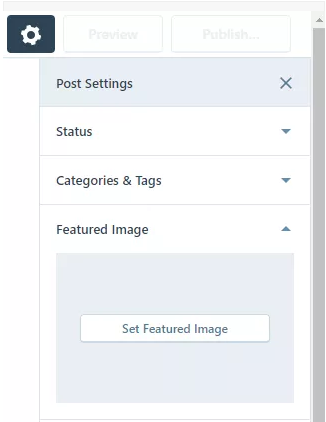 Figure G
Link to Contact IFP: here